

The Ergonomics of a Chair: How to Choose and Set Up an Ergonomic Office Chair
Introduction: Why Chair Ergonomics Matter in 2026
Office workers in Singapore and across Asia routinely spend 30 to 40 hours per week sitting at a desk. That volume of prolonged sitting takes a measurable toll on the human body - lower back pain, neck and shoulder strain, numb legs, and persistent fatigue are not minor inconveniences. They are early symptoms of musculoskeletal disorders that can become chronic discomfort if left unaddressed.
In Singapore, workplaces report an average of 338 cases of work-induced musculoskeletal disorders per year, with roughly 91% involving back injuries.
The root cause in many cases is not the act of sitting itself but how a person is sitting and what they are sitting on. A poorly designed office chair forces the body into a fixed, unnatural position, compressing lumbar discs, straining surrounding muscles, and restricting circulation in the legs.
This article breaks down what the ergonomics of a chair actually means, which chair features matter most, and how to adjust any ergonomic office chair for your body. Along the way, we will reference chairs from the Ergoworks range - the Airflex chair, Truly Comfort Chair, and Duo Rest Chair - as practical examples, alongside the science and Singapore standards that inform good ergonomic design.
What Does "Ergonomic" Mean for a Chair?
Ergonomics is the science of designing tools, furniture, and environments to fit the human body rather than forcing the body to adapt. When applied to a chair, this means the seat should accommodate your body dimensions, preserve natural spinal curves, and reduce stress on joints and muscles.
An ergonomic chair is not simply a marketing label. True office ergonomics is grounded in biomechanics, anthropometrics, and clinical research. Ergonomic chairs support the natural curve of the spine and allow multiple adjustments for individual comfort. A good ergonomic chair must support these key body areas:
- Lumbar spine - maintaining the natural inward curve of the lower back
- Pelvis - stable seating that keeps hips aligned
- Thighs - even support without pressure behind the knees
- Shoulders and neck - relaxed posture without hunching
- Arms - elbows supported to reduce upper body tension
Ergoworks applies clinical research, WSH guidelines, and tools like Ai Posture Analysis when selecting and recommending ergonomic chairs for both home offices and corporate ergonomic fit-outs.
What Makes a Chair Ergonomic? Core Chair Features Explained
A truly ergonomic office chair has several elements that adjust independently - seat height, seat depth, backrest angle and tension, lumbar support, armrests, headrest, and base stability. Missing any of these reduces its ergonomic rating and limits how well it can fit different body types.
Independent adjustments for seat height, depth, lumbar support, and armrests help fit the chair to your body. Standard chairs typically lack lumbar support and adjustability, which is why they contribute to back pain during long sessions.
The most critical ergonomic features to look for in a chair are adjustable lumbar support and seat height adjustment. Without these two, no amount of padding or styling will protect your spine over long periods.
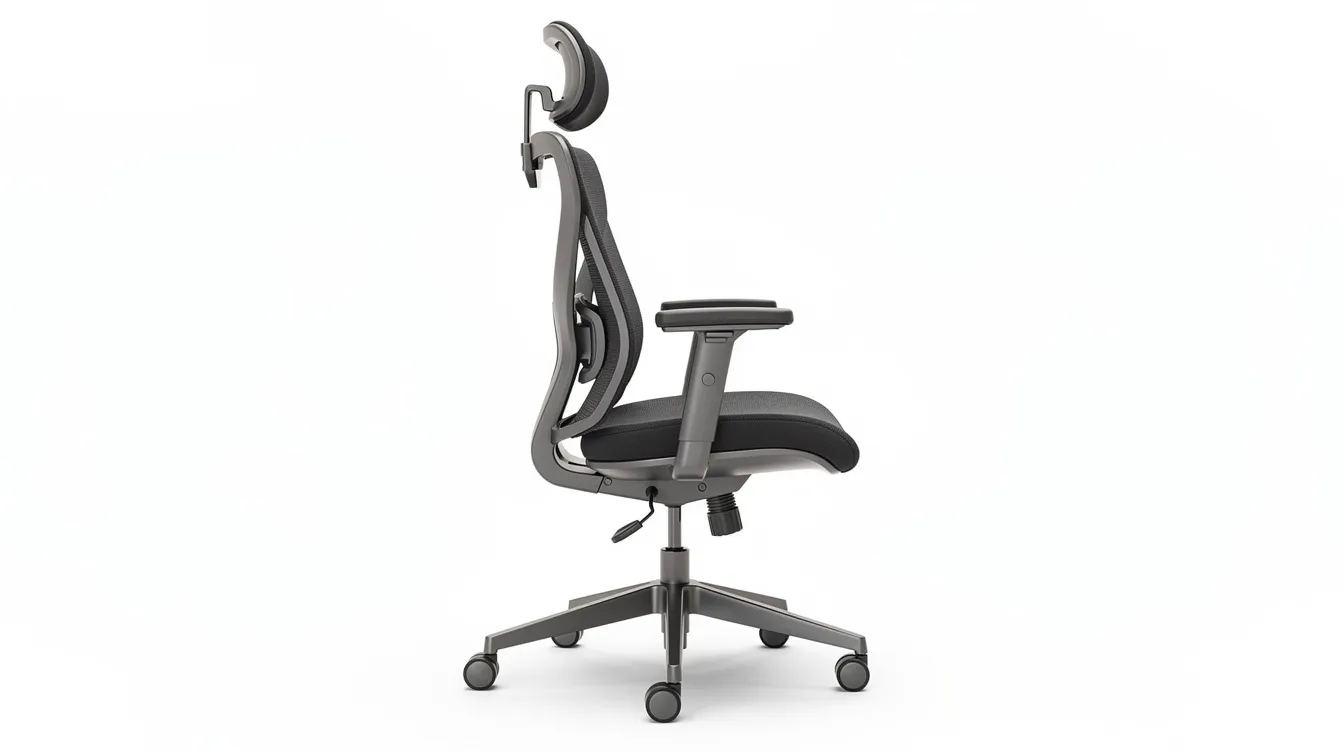
Style-only chairs - those with fixed arms, no lumbar adjustment, and rigid backrests - are not suited for six to ten hour sitting days, regardless of how they look. Ergoworks chairs like the Truly Airflex ergonomic chair and Duo Rest chair are engineered around these principles, with specialized lumbar and backrest designs built for prolonged use.
Seat Height and Seat Depth: Foundation of Neutral Sitting
Incorrect seat height and seat depth are among the most common causes of back pain and poor circulation in office workers. Getting these two settings right is the foundation of a neutral sitting position.
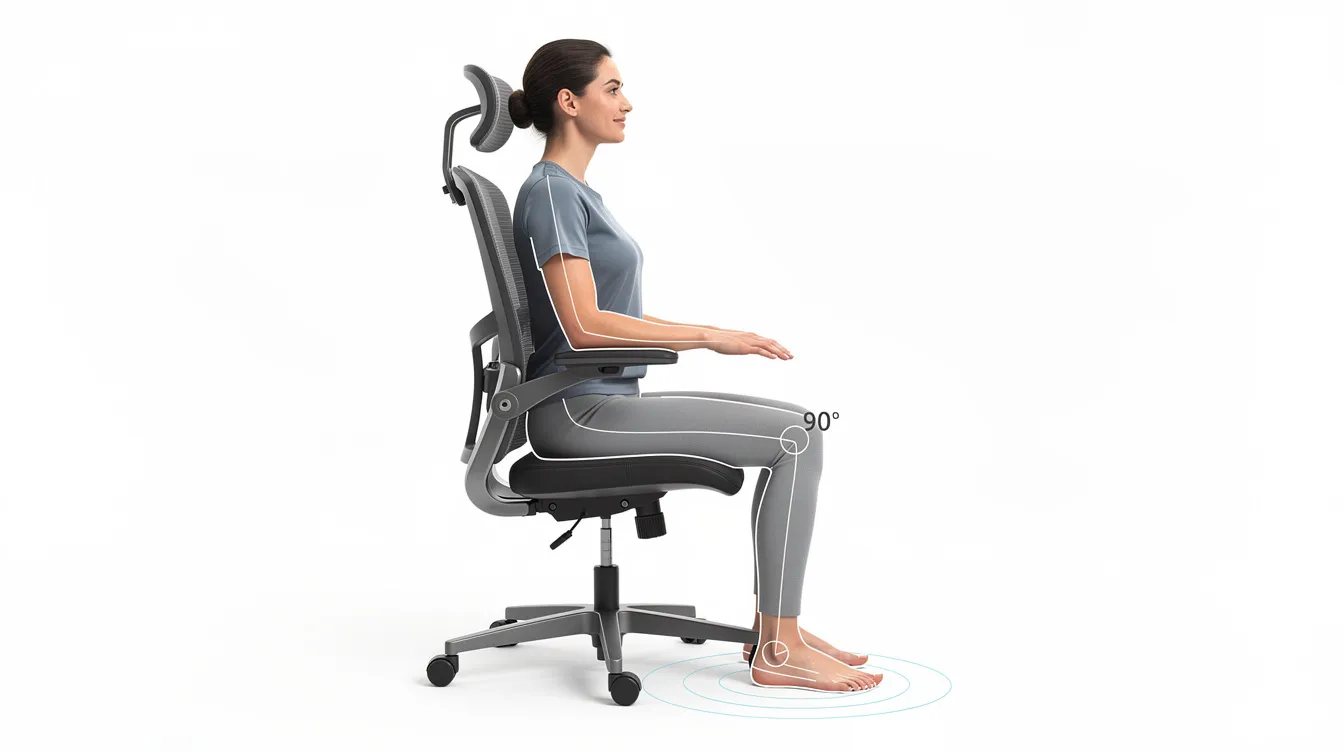
Seat height should place your feet flat on the floor with your knees at roughly 90°. Your hips should sit slightly higher than your knees to keep the pelvis in a neutral tilt. Ergonomic chairs have adjustable seat heights from 16 to 21 inches (about 40 to 53 cm), and Singapore's SS 514 standard recommends a range of 35 to 50 cm from the floor. Adjustable seat height within this range accommodates the majority of body shapes and leg lengths.
Seat depth is the distance from the backrest to the front edge of the seat pan. Proper seat depth should leave 2 to 4 inches (roughly 5 to 10 cm) behind the knees. This gap prevents the seat edge from compressing the area behind your knees, which restricts blood flow and causes numbness.
|
Problem |
Cause |
What Happens |
|---|---|---|
|
Seat too deep |
Front edge presses behind knees |
Reduced circulation, person slides forward, loses lumbar support |
|
Seat too shallow |
Thighs unsupported |
Slouching forward, increased pressure on lumbar discs |
|
Seat too high |
Feet dangle |
Pressure points under thighs, compressed blood vessels |
|
Seat too low |
Knees above hips |
Posterior pelvic tilt, flattened lumbar curve |
|
Research using EMG measurement shows that seat depth matching the 50th percentile of buttock-to-popliteal length significantly reduces lumbar muscle activity compared to extremes. If your chair lacks a seat depth slider, consider a lumbar cushion to bring the effective backrest forward, or select a model with adjustable depth. |
|
|
Lumbar Support, Backrest, and Recline
The spine's natural S-curve includes a forward curve (lordosis) in the lumbar region. When you sit, this curve tends to flatten out unless the chair actively supports it. Lumbar support prevents slumping and reduces spinal stress, making it crucial for maintaining spinal alignment throughout the workday.
Adjustable lumbar support matches individual spine curves and aligns with the spine's natural inward curve. A study of 123 office workers found the average preferred lumbar support height was about 190 mm above the seat surface, but this varied significantly with BMI - evidence that fixed, non-adjustable lumbar systems are inadequate for a range of body shapes.
Types of lumbar support in ergonomic chairs:
- Fixed curve - basic, non-adjustable; acceptable only for short sitting
- Height-adjustable - slides up or down to match your lower back
- Depth-adjustable - moves forward or backward to control pressure
- Dynamic - adapts automatically to movement and load, like the Airflex chair's flexible lumbar system
The recommended backrest angle for desk work is a slight recline of about 100° to 110°. A synchro-tilt mechanism, where the seat pan tilts in coordination with the backrest recline, helps maintain lumbar lordosis even as you shift positions. Without this, the lumbar spine segment angle at L4/L5 can drop from roughly 11.7° to as low as 2.8° when reclining on a rigid system.
Proper lumbar support reduces lower back pressure during sitting. A rigid upright posture actually increases disc compression - gentle recline combined with dynamic support is far healthier for long periods at a desk.
The Duo Rest chair addresses this with twin backrests that cradle the lumbar spine and redistribute pressure across the mid back and upper back. The Airflex chair uses a flexible, dynamic lumbar support system that responds to your movements.
Armrests, Neck, and Shoulders: Reducing Neck and Shoulder Strain
When your arms hang unsupported while typing or mousing for hours, your shoulders compensate by hunching upward. This creates tension in the upper back and neck, leading to shoulder strain and chronic discomfort over time. Adjustable ergonomic chairs reduce neck and shoulder strain by keeping the upper arms and shoulders in a relaxed, neutral position.
Armrests should adjust to support relaxed shoulders, with your elbows bent at a 90° angle when seated. Your upper arms should hang close to your torso, forearms resting lightly on the armrest pads. Ergonomic chairs should have 4D adjustable armrests for optimal support - adjusting height, width, depth, and pivot so the pads meet your arms where they naturally fall rather than forcing your shoulders up or out.
The Airflex chair takes this further with 5D armrests, adding an angle adjustment for precision alignment with your desk and computer screen setup.
Headrest guidance: A headrest is most useful when leaning back during calls or video watching. It should align with the base of the skull, supporting the head without pushing the neck forward. Many gaming chairs position headrests too high or too far forward, which can increase rather than reduce strain. If your work involves constant forward-focused screen time, a headrest is less critical than proper armrest and lumbar settings.
Quick armrest check: Set armrest height so your shoulders stay level and relaxed - not elevated. Slide armrest pads so your forearms rest naturally while typing. If the armrests hit your desk, lower them or adjust width until they clear the desk edge without forcing your shoulders to compensate.
Chair Materials, Base, and Stability
Seat and back materials directly affect comfort, posture, and thermal regulation. Breathable materials like high-performance mesh promote airflow and prevent heat buildup - a major concern in tropical climates like Singapore's, where leather and faux leather seats can trap heat and cause discomfort during long sessions.
- Mesh backs - preferred for warm offices; allow continuous airflow, reduce sweat
- High-density foam seats - provide consistent support, distribute weight evenly, reduce pressure points under the ischial tuberosities
- Hybrid designs - mesh back with foam seat pan offers the best of both for prolonged sitting
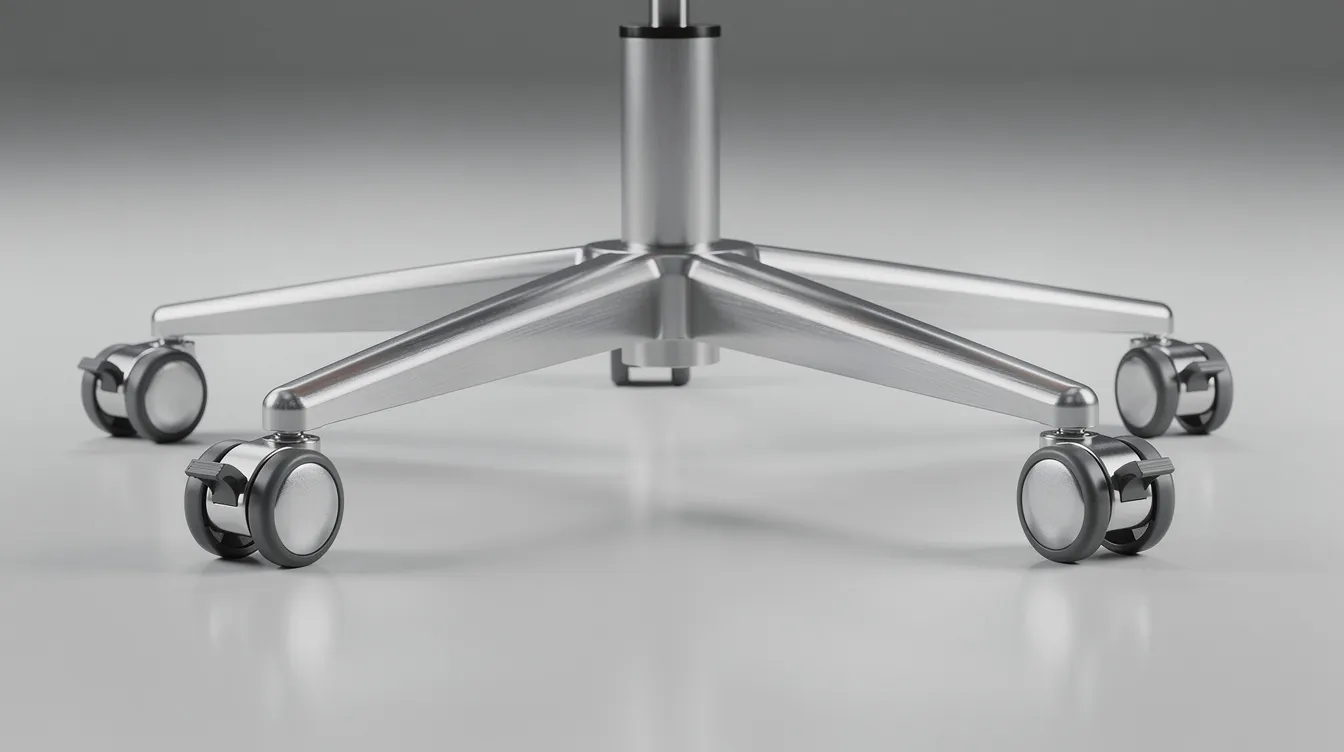
A sturdy five-point star base prevents tipping while paired with casters matched to your floor type. Soft rubber casters protect a hard surface like tile or hardwood; harder casters grip carpet effectively. A five-point star base is the stability standard for ergonomic chairs, and certified gas lift cylinders with appropriate weight ratings are essential - especially for corporate bulk purchases where chairs must safely accommodate a wide range of users.
Office Chair vs Gaming Chair vs Specialty Ergonomic Chairs
Gaming chairs are styled like racing seats and often look impressive, but many lack adjustable lumbar support, proper seat depth adjustment, and the synchro-tilt mechanisms that define a good ergonomic chair. Standard chairs and many gaming chairs force users into a fixed sitting position, which works against the body's need for movement and postural variety.
When does each chair type make sense?
- Fully adjustable ergonomic task chair (e.g., Airflex chair or D2 Dual Comfort Chair D2-200M) - all-round work chair for coding, writing, trading, and hot-desking teams. Highly adjustable with 12-point adjustment, suits users 140 to 180 cm tall.
- Plush ergonomic executive chair (e.g., Truly Comfort Chair) - focus on cushioned comfort with ergonomic structure for executives and home offices wanting optimal support during long periods of focused work.
- Medical-style back support chair (e.g., Duo Rest Chair) - designed for users with chronic lower back pain; twin backrests actively cradle the lumbar spine to reduce strain and improve posture.
- Gaming chairs - acceptable for short recreational sessions but generally not recommended as a primary work chair due to limited adjustability and poor breathability.
For enterprise fit-outs, balance aesthetics, ergonomic rating, budget, and the variety of body types across your teams. A single chair type rarely fits everyone.
How to Adjust Your Ergonomic Chair: Step-by-Step Setup Guide
Proper chair adjustment is crucial for maximizing the benefits of ergonomic seating. Follow this sequence:
- Seat height - Sit with feet flat on the floor. Adjust until your knees form roughly a 90° angle and your elbows are level with the desk surface.
- Seat depth - Slide the seat pan so there are 2 to 4 inches between the front edge and the back of your knees.
- Lumbar support - Raise or lower the lumbar pad until it fits snugly into the natural inward curve of your lower back.
- Backrest angle - Set the adjustable backrest to a slight recline (100°–110°). Adjust tilt tension so the backrest supports you without pushing you forward.
- Armrests - Position so elbows rest at 90°, shoulders relaxed, forearms parallel to the desk.
- Headrest - Align with the base of your skull. Skip if your work is primarily forward-facing screen work.
- Screen height - Top of your computer screen should sit at or just below eye level to prevent reducing neck strain.
If you are shorter and cannot keep feet flat even at the lowest seat height, use a footrest. Spend at least 20 to 30 minutes in the chair doing typical work before judging comfort - ergonomic chairs can feel different from what you are used to.
Ergoworks offers on-site ergonomic adjustment, Ai Posture Analysis, and Ergonomic Talks that help teams set up chairs correctly from day one.
Health Benefits and Workplace Impact of Ergonomic Chairs
Using ergonomic chairs lowers the risk of musculoskeletal issues in areas like the neck, shoulders, and back. Ergonomic chairs can mitigate the risk of chronic musculoskeletal disorders during sedentary desk work - a finding supported by systematic reviews showing immediate reductions in self-reported pain after chair interventions.
Key benefits backed by research:
- Ergonomic chairs reduce back pain by supporting spinal alignment
- Ergonomic chairs improve posture and reduce slouching
- Ergonomic chairs promote better circulation during prolonged sitting
- Proper ergonomic chairs enhance employee wellbeing and productivity
These benefits compound when paired with standing desks, monitor arms, micro-breaks, and proper workstation layout. A chair alone is not a cure - it is a critical component of a broader workspace strategy.
Organizations that upgrade from basic office chairs to ergonomic solutions paired with standing desks and accessories consistently report fewer back pain complaints, reduced absenteeism, and higher focus among teams. Investing in quality ergonomic chairs is a long-term health and performance strategy, not a luxury purchase.
Choosing the Right Ergonomic Chair With Ergoworks
Selecting the right ergonomic chair depends on your body shape, typical sitting duration, task type, and existing workstation setup. Here is a quick matching guide across the main categories:
|
User Profile |
Recommended Chair |
Why |
|---|---|---|
|
General office work, hot-desking teams |
Airflex Chair |
Highly adjustable (12-point system), fits 140–180 cm, 5D armrests, breathable mesh |
|
Executive or home office, comfort-focused |
Truly Comfort Chair |
Plush ergonomic design with structured support for long sessions |
|
Chronic lower back pain, post-injury recovery |
Duo Rest Chair |
Twin backrests cradle the lumbar spine, redistribute pressure across the back |
|
Ergoworks provides showroom trials, professional ergonomic advisory, and Ai Posture Analysis to match users to the correct chair and settings. For organizations, corporate catalogues, bulk procurement support, and WSH compliance guidance simplify the process of standardizing ergonomic office chairs across teams, and options like the Truly One ergonomic chair help cover a wide range of user needs. |
|
|
Before you commit: test the chair, check every core adjustment feature on the spec sheet, confirm comfort over at least 20 to 30 minutes of real work, and get expert help if pain persists. The right work chair should feel like it disappears beneath you - supporting your posture without demanding your attention.